 Tandem Player
 Tandem Player for Windows
The motion is greater than you think. This plays it properly.
Tandem Player is a Windows video player that drives your device off the motion recorded for a video — and lets you reshape that motion while it plays, without touching the file. Unlock it online once and it runs offline for a year at a time. No account, no subscription.
The free build plays — library, device sync, headset, the lot. A Viewer key adds the tools that shape how it moves and the tools that change the motion rather than play it; a Full key adds the generator too. Same download either way.

Contents
01
Your library, not a library
Tandem ships with nothing in it. You point it at the folders you already keep, and it does the sorting.
It finds your videos, pairs each one with its motion files, builds thumbnails, and plays them with your device driven live off that recorded motion. That index is built on your PC. Nothing about your library is sent anywhere, and there is no account to make.
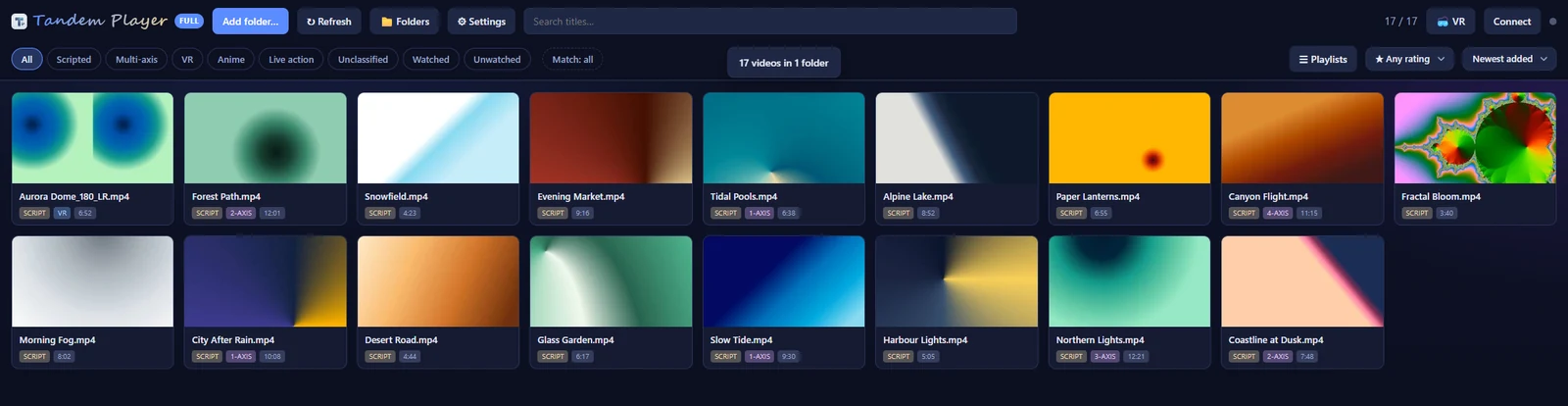
- Add as many folders as you like — Tandem scans them and remembers them
- Search by title; filter by Scripted, Multi-axis, VR, Watched or Unwatched
- Sort by newest, oldest, name, length, folder, or shuffle
- Multi-axis motion is picked up automatically, companion files and all — one file per axis, each named after the video
- An intensity strip under the video shows where the action is — click it to jump there
02
Shape the motion while it plays
A recording is one person's idea of the right range. Your hardware, and your preference, are not obliged to agree with it.
Every adjustment here is live. It changes what goes to the device as it plays and leaves your motion files exactly as they were — the region editor in section 04 is the one part of Tandem that writes.
- Depth — scales every stroke around its own centre, so the recording's contrast survives instead of flattening out
- Top reach and Bottom reach — push peaks toward the ceiling and valleys toward the floor
- Device speed — run the device faster or slower than the motion while the picture keeps its normal pace, with an option to apply it to the stroke axis only
- Latency offset — nudge device timing against the picture until it lands right
The wheel over the picture is depth. One key (G by default) switches to Finish mode, which stops the motion — or plays a finish motion of your own, if you have set one.
03
Build motion the recording never had
Most recordings are stroke and nothing else. If your device has more axes than that, Tandem can write the rest itself.
Twist, roll, pitch, surge, sway and vibration, each generated against the stroke track with its own motion style, range, speed, timing and direction. Find a combination that suits a device and save it as a preset, then apply the whole rig to any video in one click.
None of this is baked in. Turn a preset off and you are back to the motion exactly as it was recorded.
04
Edit without leaving the player
The stretch that is too shallow is usually forty seconds long. Fixing it should not mean a second application.
Select a region on the timeline and raise or lower its peaks and valleys a step at a time. Loop that region while you tune it, undo anything, and restore the untouched original whenever you want.
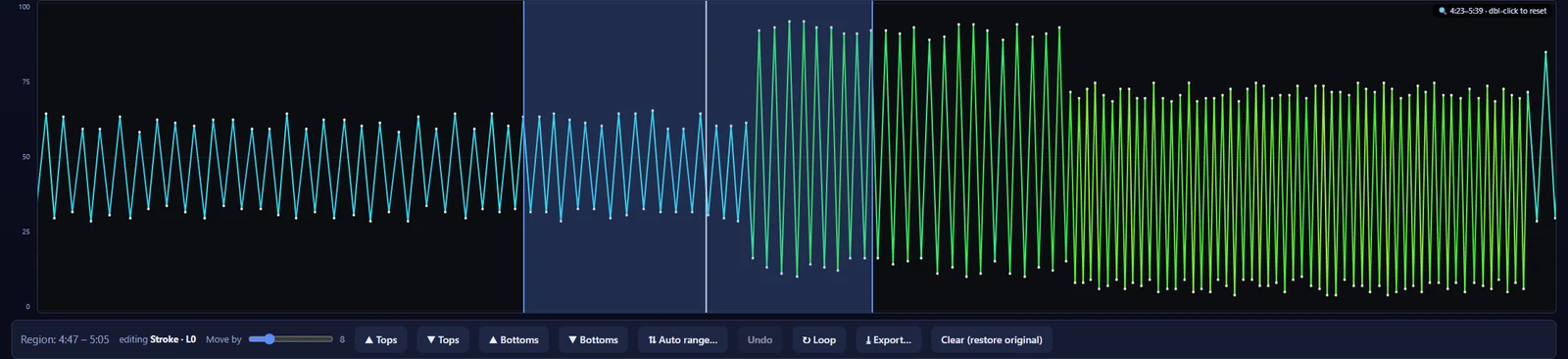
Export the result as a new motion file, or save it in place — saving overwrites the
original and keeps a one-time .bak of it beside
it, so the first save is always reversible.
05
In the headset
Play through DeoVR or HereSphere and Tandem keeps the device in sync with what the headset is actually playing.
Or use Tandem's own headset player, which keeps the device in sync too. The two are separate, and each needs one thing switched on:
- DeoVR or HereSphere — switch on the player's remote control setting, then connect Tandem to it. Library sharing is only needed for that player to reach your Tandem library
- Tandem's own player — runs in a web browser and is served by Tandem from your PC, so it needs Share my library. Opening it switches sharing on, and sharing stays on, at every launch, until you switch it off
In Tandem's own player you browse, play, seek, recenter and set your viewing distance from inside the headset. Depth and reach are on their own page there, so a session never sends you back to the desk — and with a licence, an Edit page adds auto-range, undo and save.
Headset playback works over your own network. Tandem listens on your LAN only while library sharing is on. You switch it on, or Tandem does when you send a video to the headset or open its own player, and it stays on until you switch it off. While it is on, any device on that network can reach your library — there is no password.
06
Built for the keyboard
Thirty actions, all remappable, so a session never needs the mouse. Depth on the wheel. One key (G by default) for Finish mode, which stops the motion — or plays a finish motion of your own, if you have set one.
07
Make it yours
Twenty-eight appearance presets, and one click turns the whole app over: window, cards, buttons, the motion strip and the player. Underneath them are five pickers — colour, buttons, decoration, font and text size — and a few of the presets are dressed for the season. Four of the twenty-eight are in the free build. With a key you can also build your own: fourteen colours over any of the looks, repainting the app as you drag them, and a Share button that turns the result into a short block of text that anybody else with a key can paste back.
Tandem speaks English, Traditional Chinese, Simplified Chinese, Korean and Japanese. Every menu, dialog, button and message follows, and all five are in the free build.
And if the PC is not only yours: Safety Mode asks for a password once each launch, before the library is drawn. Three wrong tries, or the forgot button, and Tandem opens on its empty Add-folder screen with nothing else on it, and forgets which folders the library used until you add them again. Your files are never touched — it keeps the library off the screen, not off the disk.
08
What leaves your PC
Short enough to print, so here it is in full.
Unlocking your key
Sends the key itself and a one-way code for the machine (plus a flag if that code had to be made from the PC's name and processor), and gets back a file kept in your Windows profile. Every later launch reads that file instead. It is good for a year. If the licence server cannot be reached, the key unlocks anyway for seven days, and Tandem tries again each time it starts — sending the key again until the server answers. The same happens if the year ever runs out.
One check per launch
About half a minute in, Tandem asks whether your key has been moved to another PC. That request carries a short licence reference and the same one-way code — not the key, no filename, nothing about what you play. If it cannot get through, nothing changes and the app carries on. That same check quietly collects the next year when the unlock file is inside its last two months, so in normal use unlocking is a one-time thing.
Those two are the only things Tandem sends to a server of mine, and between them they carry your key, that reference and that code. Nothing about your library is in either.
Script sources
In the headset, with a licence, a scene you have no motion file for can be looked up at a supported script source — one site you add yourself, by typing its address and signing in. There is none to begin with, so a fresh install looks nothing up anywhere. Once you have added one, Tandem looks up any streamed scene that has no motion file on your PC, by itself unless you switch that off. A lookup sends that site the scene's number, read from the video's file name, under your sign-in there. Opening the Script sources section asks the site whether you are signed in.
Tandem serves its own interface on 127.0.0.1 while it is
open, and nothing is left running once you close it.
09
What you get
- Tandem Player 1.3.3 for Windows (64-bit), as a folder you unzip and run — no installer, nothing written to your registry, nothing left running once you close it
- A Viewer or Full key, delivered the moment your payment clears — one PC per key, and you can move it to another PC: the first move free, after that once every 30 days
- Free updates, forever — no matter which version you bought at
Requirements
- Windows 10 or 11, 64-bit, or macOS 12 Monterey or newer on any Mac (Apple silicon or Intel)
- Your own video files, and the motion files that go with them
- A supported device — optional. Tandem is a perfectly good player without one
The first time you run it, Windows may show Windows protected your PC. Click More info, then Run anyway. Tandem is not code-signed, so this warning is expected.
On a Mac, macOS blocks the first open. Go to System Settings, then Privacy & Security, and click Open Anyway. The README in the zip walks through it. One Mac download runs on Apple silicon and Intel, macOS 12 or newer.